


Download Send Anywhere – Secure Free File‑Sharing Tool for Windows, Mac, Android & iOS
Overview
Send Anywhere is a free, cross‑platform file‑sharing service that lets individuals and teams move files of any size without compromising quality. Whether you are sending a single photo, a multi‑gigabyte video project, or an entire folder of design assets, the app creates a temporary, encrypted link that can be opened on any device. The core promise of Send Anywhere is speed combined with security: files travel through a peer‑to‑peer channel when possible, falling back to cloud‑based relays that are protected by 256‑bit AES encryption.
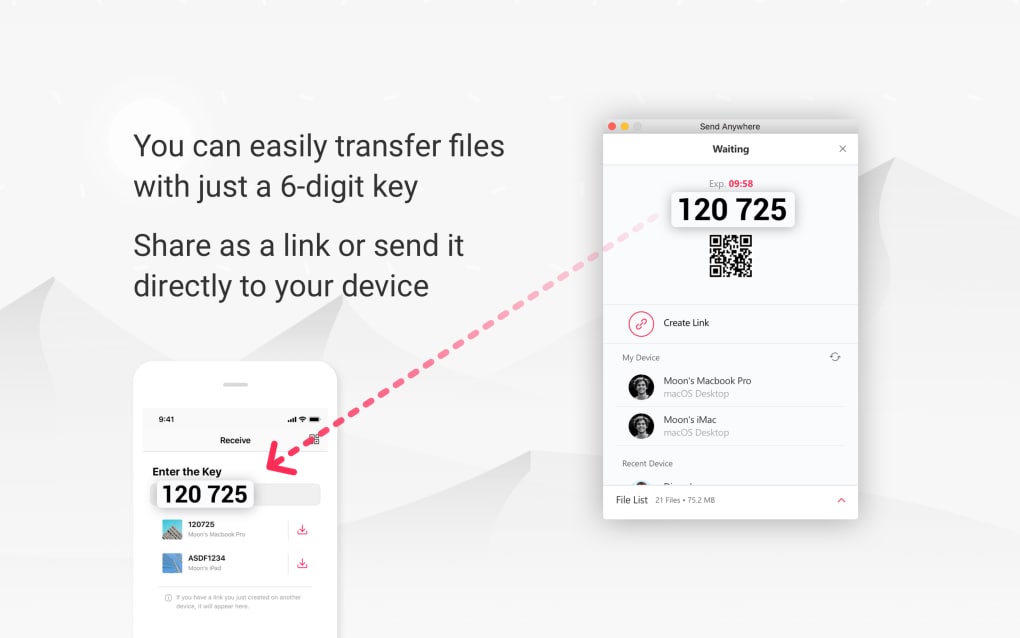
Because the service does not impose a hard size limit, it is popular among photographers, developers, educators, and remote‑work teams that need a reliable, no‑cost alternative to premium cloud storage. The interface is intentionally minimalist—just a drag‑and‑drop area, a “Send” button, and a six‑digit key or QR code for the recipient. This simplicity reduces the learning curve and makes the tool suitable for both tech‑savvy users and casual consumers.
In addition, Send Anywhere offers optional features such as password protection, link expiration timers, and a desktop client that runs in the background to catch clipboard copies automatically. All of these capabilities are delivered without ads, and the service is continuously updated to support the latest operating‑system releases and security standards. Whether you are working on a Windows workstation, a macOS laptop, an Android phone, or an iOS tablet, Send Anywhere provides a seamless, secure bridge for every file‑transfer need.
Key Features & Built‑In Security
- Unlimited File Size – No artificial caps; you can send files ranging from a few kilobytes to several terabytes.
- 256‑Bit AES Encryption – All transfers are encrypted end‑to‑end, ensuring that only the intended recipient can decrypt the data.
- Cross‑Platform Compatibility – Native apps for Windows, macOS, Linux, Android, iOS, and ChromeOS, plus a web‑based portal for browsers.
- One‑Click Transfer – Drag a file onto the app, click “Send,” and a short key or QR code is generated instantly.
- Password & Expiration Options – Add an optional password and set a custom expiration time for the download link.
- Offline Peer‑to‑Peer Mode – When both devices are on the same local network, files are sent directly without touching the cloud.
- Automatic Clipboard Capture (Desktop) – The desktop client can monitor the clipboard and create a shareable link with a single shortcut.
- Secure QR Code Sharing – Recipients can scan a QR code with their mobile device to start the download instantly.
- Multi‑Device Sync – Signed‑in users can see a history of sent and received files across all their devices.
- Free with Optional Premium Add‑Ons – The core service is free; premium plans add larger storage, custom branding, and API access.
Each of these features is designed to keep the user experience fluid while maintaining a high security standard. The combination of unlimited size, strong encryption, and flexible sharing options makes Send Anywhere a standout tool for both personal and professional environments.
Installation, Usage & Compatibility
How to Install on Different Platforms
Getting started with Send Anywhere is straightforward. For Windows and macOS, visit the official website, download the installer (.exe or .dmg), and follow the on‑screen prompts. The installer checks for required dependencies and automatically creates a desktop shortcut.
On Android and iOS, locate “Send Anywhere” in the Google Play Store or Apple App Store, tap “Install,” and grant the necessary permissions for file access and notifications. Linux users can download a portable AppImage or use the Snap package, while ChromeOS users can add the web app from the Chrome Web Store. All installations are signed with a trusted certificate, so you can be confident that the binary has not been tampered with.
Step‑by‑Step Transfer Process
Once installed, the workflow consists of three simple steps:
- Select or drag the file you want to share into the main window. The app instantly calculates a unique six‑digit key.
- Choose your sharing method—copy the key, generate a QR code, or click “Create Link” to produce a short URL.
- Send the key or link to the recipient via chat, email, or by scanning the QR code. The recipient opens the app (or the web portal), enters the key or scans the QR code, and the download begins automatically.
If you enable password protection or set an expiration timer, the recipient must also provide the password before the download can start. The entire process typically takes only a few seconds for small files and a few minutes for larger media, depending on network speed.
Supported Operating Systems
- Windows 10, 11 (64‑bit)
- macOS 12 Monterey and later
- Linux distributions (AppImage, Snap, or .deb)
- Android 8.0 and later
- iOS 13 and later (iPadOS included)
- ChromeOS (via web app)
Pros and Cons
- Pros
- Truly unlimited file size.
- Strong 256‑bit AES encryption.
- Works on virtually every modern OS.
- No ads or hidden fees for the core service.
- Quick peer‑to‑peer mode for local networks.
- Cons
- Free version does not include cloud storage for later retrieval.
- Link‑based sharing can be less intuitive for non‑technical users.
- Occasional speed variation when routing through cloud relays.
Frequently Asked Questions
Is Send Anywhere really free?
Yes, the basic file‑transfer service is completely free with no hidden ads. Premium plans are optional and add features such as longer link retention, larger cloud storage, and API access.
How secure are the transfers?
All data is encrypted with 256‑bit AES during transit. When you enable a password or expiration timer, an additional layer of protection is added.
Can I transfer files between iOS and Android devices?
Absolutely. The app generates a universal six‑digit key or QR code that works on any platform with the Send Anywhere client or web interface.
Do I need an internet connection for large transfers?
If both devices are on the same local network, the app will use peer‑to‑peer mode, which does not require internet bandwidth. Otherwise, the transfer routes through encrypted cloud relays.
What happens to the file after the recipient downloads it?
The temporary link and encrypted data are automatically deleted from Send Anywhere’s servers once the download completes or the expiration timer elapses, ensuring no residual copies remain.
Conclusion & Call to Action
Send Anywhere delivers on the promise of a truly universal, secure, and cost‑free file‑sharing experience. Its strength lies in the combination of unlimited size, robust 256‑bit AES encryption, and a clean, platform‑agnostic interface that works equally well on a Windows desktop, a macOS laptop, or a mobile phone. While power users may eventually gravitate toward premium plans for added cloud storage or API integration, the free tier already covers the majority of everyday scenarios—from sharing a vacation photo with family to moving a multi‑gigabyte project file between remote teammates. Installation is painless, the transfer process is intuitive, and the optional security settings give you control over who can access your data and for how long. In an era where data privacy is paramount, Send Anywhere’s commitment to end‑to‑end encryption and automatic link expiration provides peace of mind without sacrificing speed.
If you’re looking for a reliable way to move files quickly and securely without paying a subscription, download Send Anywhere today. Click the button below to get the latest version for your operating system, and start sharing with confidence.







